Make a rose feel like a precious object
Brand & product
Sign up for creative credits · Buy 2+ for 10% extra permanent credits
Describe the image you see in your mind. Shape the composition, explore a visual style and turn your feedback into a clear creative brief with Seedream 5.5 MCP.
Create an image ↗ · Connection guide ↓
Image creation is openThe image workspace includes text and reference-image workflows. Sign in, choose a model, ratio and size, then review the credit quote to begin.
Use ChatGPT to organize the subject, lighting, palette and composition into a clear image brief.
MCP configuration example
https://seedream5-5.art/api/mcpCopy a creative brief, sign in to Seedream, choose the model and image settings, review the credit quote and generate.
Open image workspace ↗Use your preferred AI tool to organize the subject, composition, light and style, then bring the creative brief into the Seedream image workspace.
Copy a creative brief, sign in to Seedream, choose the model and image settings, review the credit quote and generate.
From an idea to a visual direction
Switch creative scenes to explore each visual direction and brief. Copy a description you like and continue in the image workspace.
Prepare a Seedream 5.5 image brief showing futuristic portrait with blue light and silver details. Describe the subject, lighting, palette and framing. Propose the available image model and credit quote before generation.
Start with the subject and framing. Agree on the light, color palette and details to preserve, then choose the available image model and review its quote.
Visual direction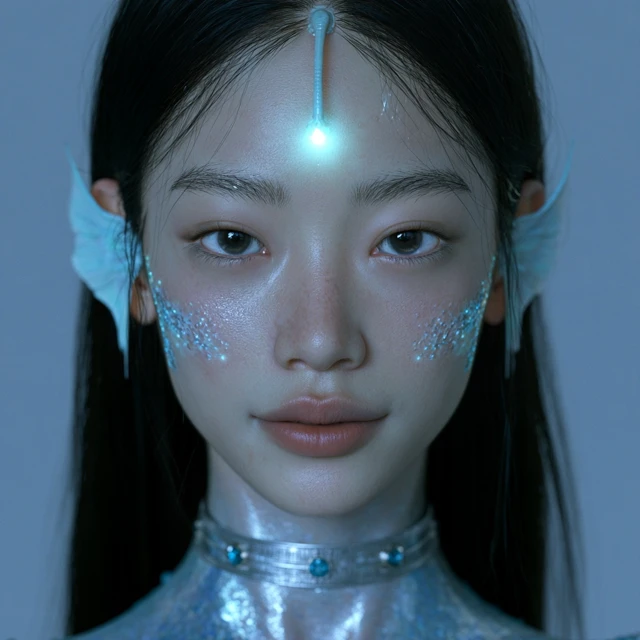
Prepare a Seedream 5.5 image brief showing stylized woman wearing pink heart sunglasses. Describe the subject, lighting, palette and framing. Propose the available image model and credit quote before generation.
Start with the subject and framing. Agree on the light, color palette and details to preserve, then choose the available image model and review its quote.
Visual direction
Prepare a Seedream 5.5 image brief showing wide-eyed shaggy cartoon wolf. Describe the subject, lighting, palette and framing. Propose the available image model and credit quote before generation.
Start with the subject and framing. Agree on the light, color palette and details to preserve, then choose the available image model and review its quote.
Visual direction
Prepare a Seedream 5.5 image brief showing fashion portrait in a lively urban cafe. Describe the subject, lighting, palette and framing. Propose the available image model and credit quote before generation.
Start with the subject and framing. Agree on the light, color palette and details to preserve, then choose the available image model and review its quote.
Visual direction
Prepare a Seedream 5.5 image brief showing blue-lit portrait holding a reflective glass. Describe the subject, lighting, palette and framing. Propose the available image model and credit quote before generation.
Start with the subject and framing. Agree on the light, color palette and details to preserve, then choose the available image model and review its quote.
Visual direction
Prepare a Seedream 5.5 image brief showing weathered pink android profile. Describe the subject, lighting, palette and framing. Propose the available image model and credit quote before generation.
Start with the subject and framing. Agree on the light, color palette and details to preserve, then choose the available image model and review its quote.
Visual direction
Find a direction for your next Seedream 5.5 image. Open a brief, adjust it to your subject and copy it into your preferred creative tool. Each image illustrates a visual direction.
6 ideas
Brand & product
Brand & product
Characters
Art & illustration
Spaces
Art & illustration
No matching briefs. Try another word or category.
Text to image
A product launch, an editorial portrait, a storybook character or a quiet interior: start with the subject, then describe the composition and mood. Seedream 5.5 briefs work best when they say what should be visible, where it belongs in the frame and which details deserve attention. Keep the first version focused so you can judge the image against one clear goal.
Create an image ↗Prepare a Seedream 5.5 image brief showing sunlit close portrait with natural freckles. Describe the subject, lighting, palette and framing. Propose the available image model and credit quote before generation.

Reference-led creation
Use an image you have permission to share to explain a silhouette, material or lighting direction. Say exactly which parts should stay consistent and which parts can change. Before creating, check that your selected model supports the reference workflow and accepts your file. A reference communicates direction; it does not promise exact reproduction or consistent identity in every result.
Create an image ↗Prepare a Seedream 5.5 image brief showing black graphic keys on cream paper. Describe the subject, lighting, palette and framing. Propose the available image model and credit quote before generation.

Image variations
Keep the subject and framing steady while you compare a warmer palette, softer shadows or a more graphic treatment. Change one decision at a time and describe the difference you want to see. This makes a Seedream 5.5 creative conversation easier to follow, especially when a team is choosing between directions for a campaign, character or set of images.
Create an image ↗Prepare a Seedream 5.5 image brief showing colorful folk-art portrait with eyes and a cat. Describe the subject, lighting, palette and framing. Propose the available image model and credit quote before generation.

Creative direction
Bring the subject, composition and important details into one reusable brief. Review the selected model and credit quote before confirming an image.
Create an image ↗Prepare a Seedream 5.5 image brief showing cherry-topped cake with sparkling details. Describe the subject, lighting, palette and framing. Propose the available image model and credit quote before generation.

Find a direction for your next Seedream 5.5 image. Open a brief, adjust it to your subject and copy it into your preferred creative tool. Each image illustrates a visual direction.
Prepare a Seedream 5.5 image brief showing black and white cat at an ornate tea table. Describe the subject, lighting, palette and framing. Propose the available image model and credit quote before generation.
Prepare a Seedream 5.5 image brief showing surreal masked portrait with sunburst motifs. Describe the subject, lighting, palette and framing. Propose the available image model and credit quote before generation.
Prepare a Seedream 5.5 image brief showing surreal cosmic garden with a giant eye. Describe the subject, lighting, palette and framing. Propose the available image model and credit quote before generation.
Prepare a Seedream 5.5 image brief showing framed cloud standing in a green field. Describe the subject, lighting, palette and framing. Propose the available image model and credit quote before generation.
Explore image ideas, browse visual references and copy their creative briefs. Once the subject, composition and style are clear, use Create an image to continue in the workspace.
Open the image workspace and sign in. Choose a Seedream model, enter a prompt or add a reference, set the ratio and size, then review the credit quote and generate.
Browsing examples, searching ideas, previewing images and copying briefs do not deduct credits. Image generation uses the quote shown for your selected model and settings.
The image workspace includes Seedream 5.0 Pro, Seedream 5.0 Lite, Seedream 5.0 Flash and Seedream 4.0. Switch in the model selector to use each model’s image sizes, aspect ratios and reference settings.
Choose a workflow that supports references, upload your image and explain the subject, clothing, material or colors to preserve and the changes to make. The upload area shows the selected model’s file and image-count requirements.
Tasks and results appear in the workspace’s creations panel. You can also open your account history to view, preview and download images.
Prepare your next Seedream 5.5 image with a brief you can build on. Explore the examples or continue in the image workspace.
Start with the purpose, subject and composition. Follow these steps to prepare your next Seedream 5.5 creative brief.
Explain where the image will appear: a product detail page, a square social post, a cover or a presentation. Mention the audience and the feeling you want the image to communicate. Leave room for your headline if the design needs one. A specific purpose helps you choose a suitable frame and avoid spending time on a beautiful image that does not fit its destination.
List the subject, important colors and details that should remain visible. For a product, this might be the silhouette and material; for a character, it might be clothing and expression. If you share a reference, explain its role. Only upload files you can use, and check the chosen model's current requirements rather than assuming every image workflow accepts the same inputs.
The image workspace includes Seedream 5.0 Pro, Seedream 5.0 Lite, Seedream 5.0 Flash and Seedream 4.0. Switch in the model selector to use each model’s image sizes, aspect ratios and reference settings.
Before any generation, review the prompt, references, aspect ratio, available size options and credit cost. Ask for clarification if a parameter or quote is missing. Editing a brief or copying an example on this page does not submit a job. The workspace remains the current place to inspect the available controls and confirm an image generation.
After reviewing an image, describe what works and the one change that would improve it. Ask for softer light, more negative space or a different crop instead of replacing the whole brief with a long list of new instructions. Keep a useful version of the prompt for later. Seedream 5.5 creative briefs can then become a practical starting point for a related image.